The latest updates
Here is an overview of the latest developments from Johan.nl. Would you like to know more about this? Contact support@johan.nl or check help.johan.nl.
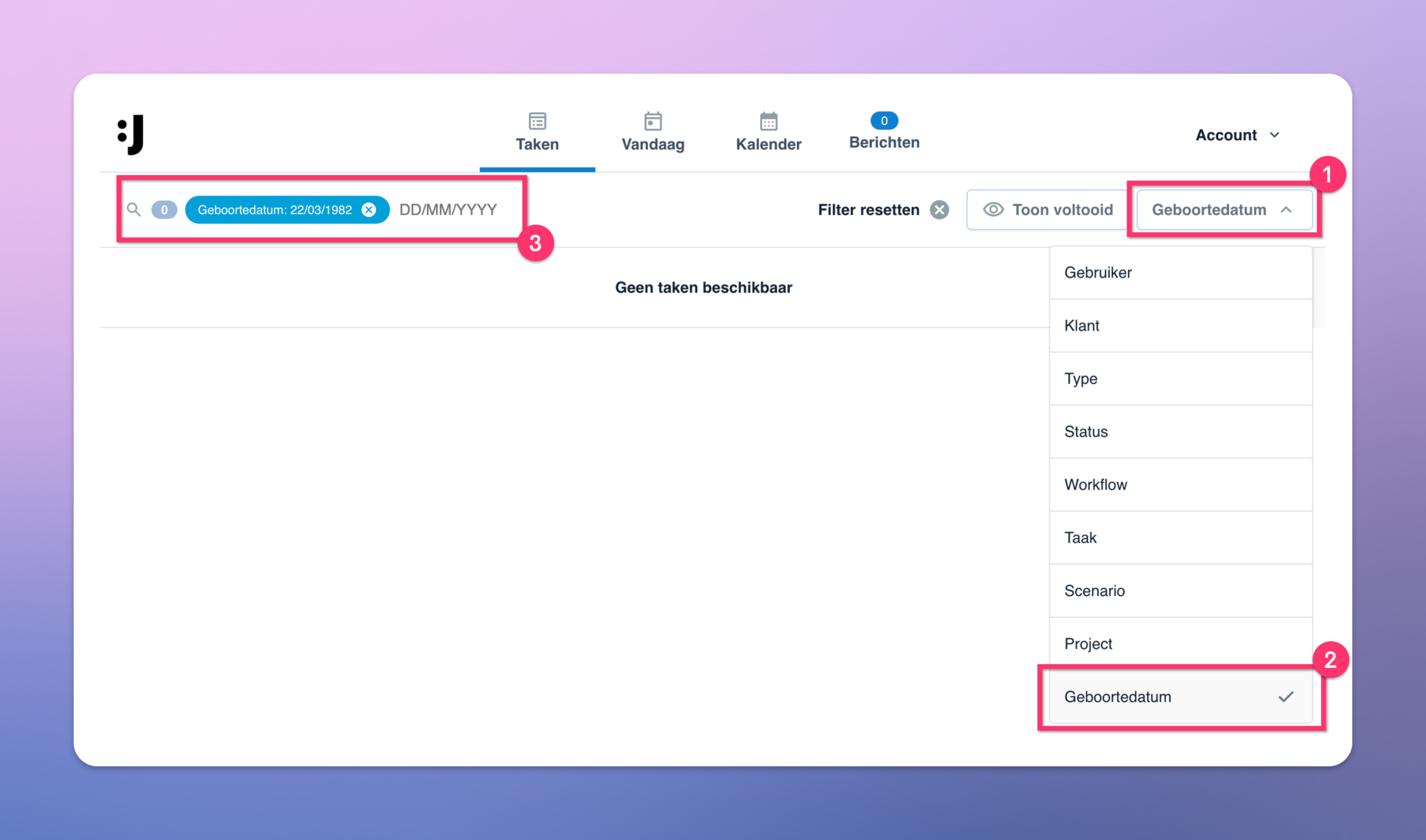
🗓️ Deelnemers zoeken op geboorte datum in professional dashboard
In het professional dashboard is het vanaf nu mogelijk om te zoeken op geboortedatum. Deze optie is toegevoegd bij de zoekopties in het profdashboard.
🔀 Sneakpreview Workflow Builder
Tijdens ons recente webinar hebben wij al een eerste inkijkje gegeven in de nieuwe Workflow Builder voor onboarding (aanmeldflows).
Wij ook aan een bredere Workflow Builder waarmee je op basis van templates binnen je project je volledig programma snel kunt klaarzetten. Je kunt een bestaande opzet gebruiken als startpunt en configureert deze vervolgens eenvoudig voor je nieuwe projecten. Hier deel ik een korte sneakpreview!
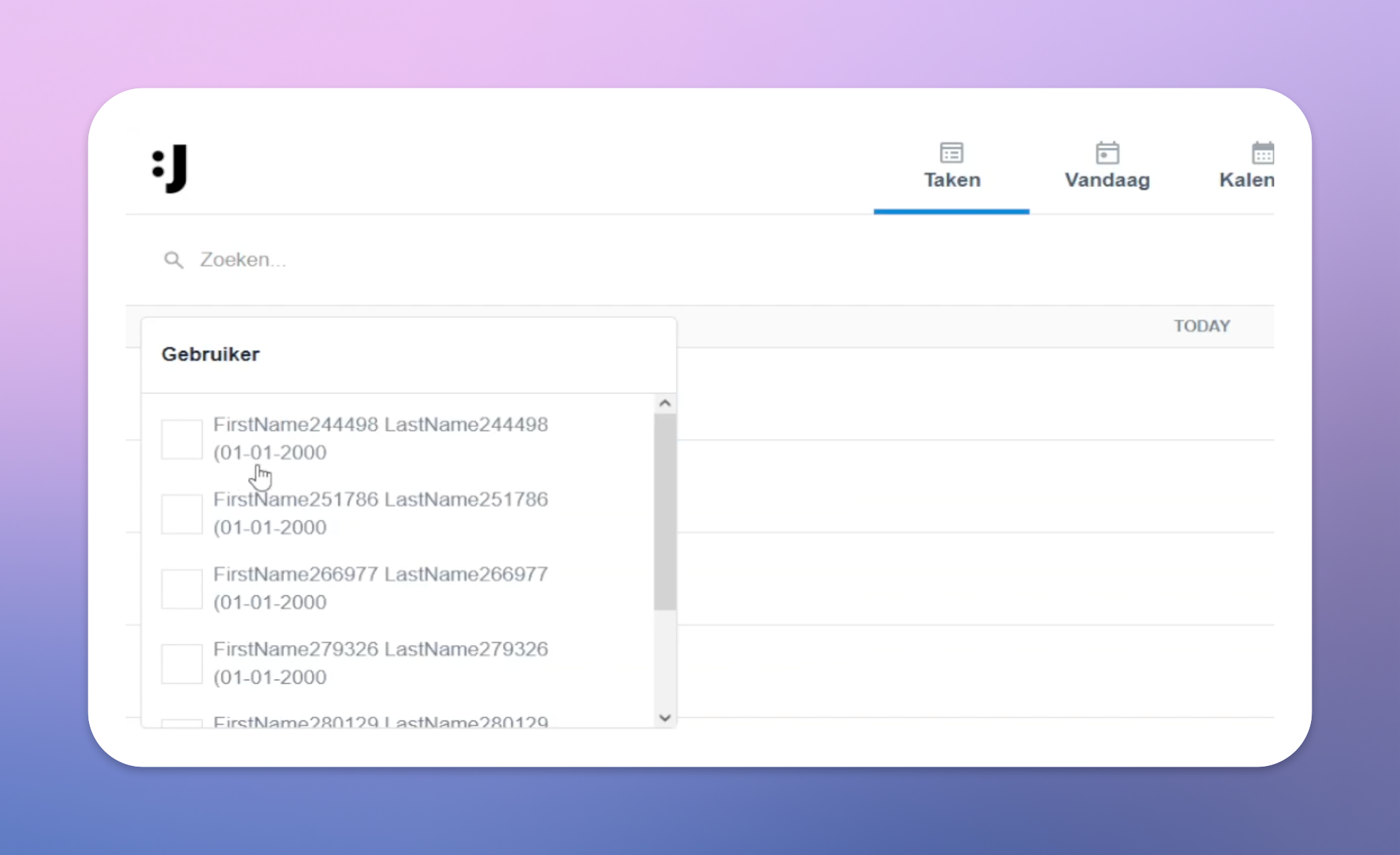
👤 Geboortedatum zichtbaar in zoekresultaten
In de zoekresultaten van het professional dashboard tonen wij nu ook de geboortedatum van deelnemers. Handig wanneer meerdere deelnemers dezelfde of een vergelijkbare naam hebben. Zo herken je sneller de juiste deelnemer en voorkom je vergissingen.
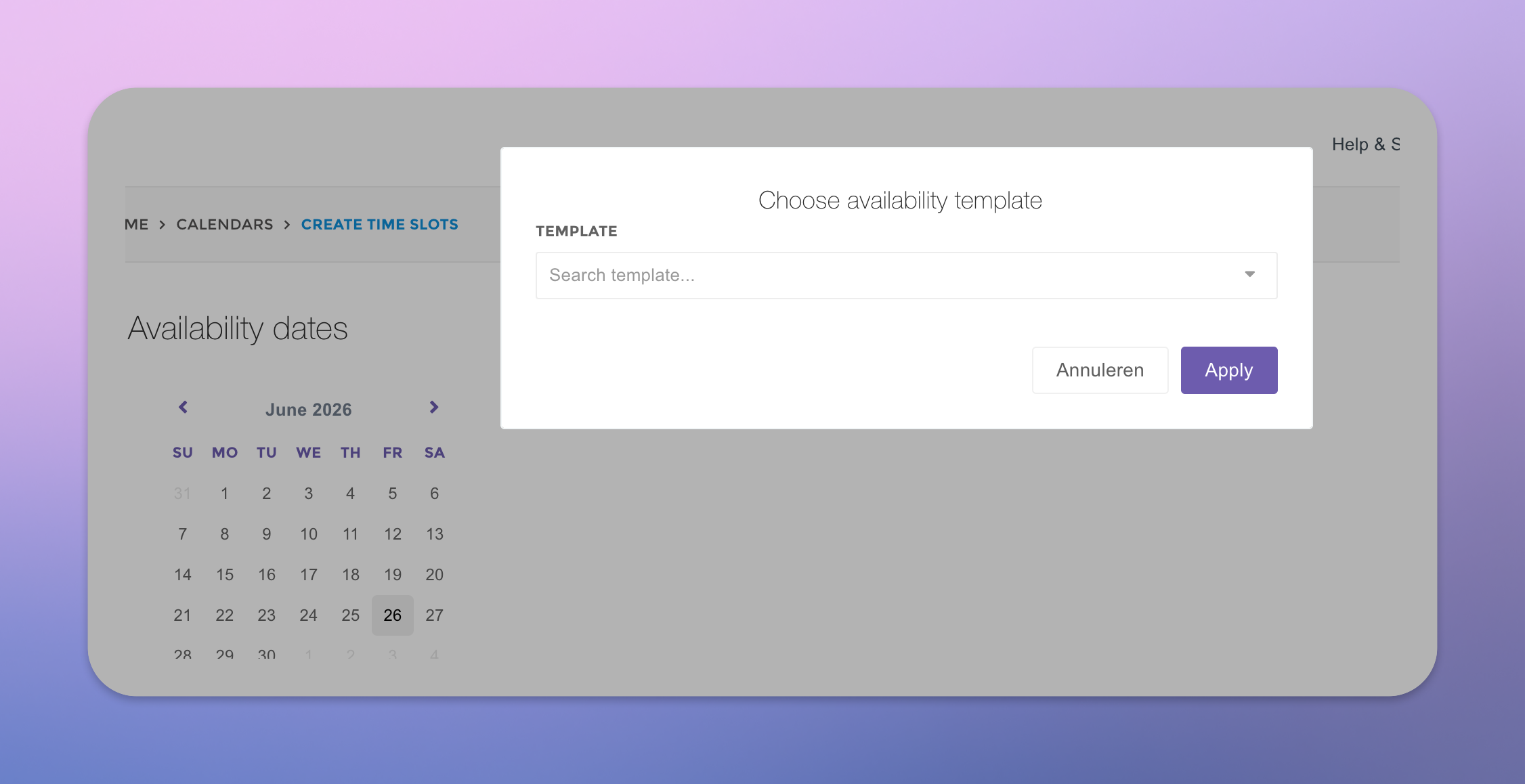
📅 Tijdslot templates – nu beschikbaar in BETA
Vanaf nu kun je in Johan werken met tijdslot templates. Hiermee maak je vooraf een vast tijdschema aan, dat je daarna eenvoudig opnieuw kunt gebruiken op iedere gewenste dag in je nieuwe kalender. Handig wanneer je vaker met dezelfde planning of tijdsindeling werkt, bijvoorbeeld bij keuringen, health checks of terugkerende afspraakdagen.
Deze functie is nu beschikbaar als beta. Je kunt er dus alvast mee aan de slag en in je testprojecten ontdekken hoe tijdslot templates jouw project setup sneller en makkelijker maken. Binnenkort delen we hier meer over.

Dit is er nieuw bij jouw projecten
Wij de eerste update uitgevoerd omtrent de nieuwe onboarding. In de product update van mei vertelden we hier al meer over. Gemist? Check dan nog even de product update van mei.
Om te weten wat er verandert is schreven wij onderstaand artikel. Enkele kleine updates die direct zorgen voor meer overzicht en makkelijker werken.
Bekijk hierboven de korte video of lees het volledige artikel hier.

Klant aanmaken? Dat gaat nu nóg sneller!
Misschien heb je het al gezien: het venster voor het aanmaken van een nieuwe klant is vereenvoudigd. Minder velden, minder klikwerk en dus sneller aan de slag met je nieuwste klant. 🚀
📍 Quickly filter for the right appointment location
Do you manage appointments across multiple locations in a single calendar? If so, we’ve just added a new feature. You can now filter by location in the calendar view of the Professional Dashboard. You’ll only see the appointments relevant to your location. This instantly makes your calendar view in the Professional Dashboard much clearer and easier to work with—especially if you manage multiple locations or teams.

Would you like to learn more about working with appointment locations? Check out our help article on creating locations. Or feel free to reach out to us at support@johan.nl. We’re happy to help!
🎯 Send targeted notifications using tags
Good news: You can now use tags as conditions in scenario notifications. This allows you to send messages only to the right group of participants, for example, based on a location tag or a specific audience tag.
This allows you to communicate in an even more targeted way, such as sending a reminder only to participants who are relevant to a specific campaign. This way, you can boost the effectiveness of your program and ensure you’re sending the right notifications!

🚀 Updated questionnaire module is live!
The updated questionnaire module is now available. The interface has been completely revamped and optimized for speed and ease of use. Participants can now complete questionnaires entirely using the keyboard, which makes for a smoother experience. This also allows professionals who administer PMOs or coaching questionnaires to work faster and more efficiently.

In addition, the look and feel now matches your organization even better. Branding colors (if set) are automatically applied to the questionnaires. You don't have to do anything—the new, modern look is ready for you right away.
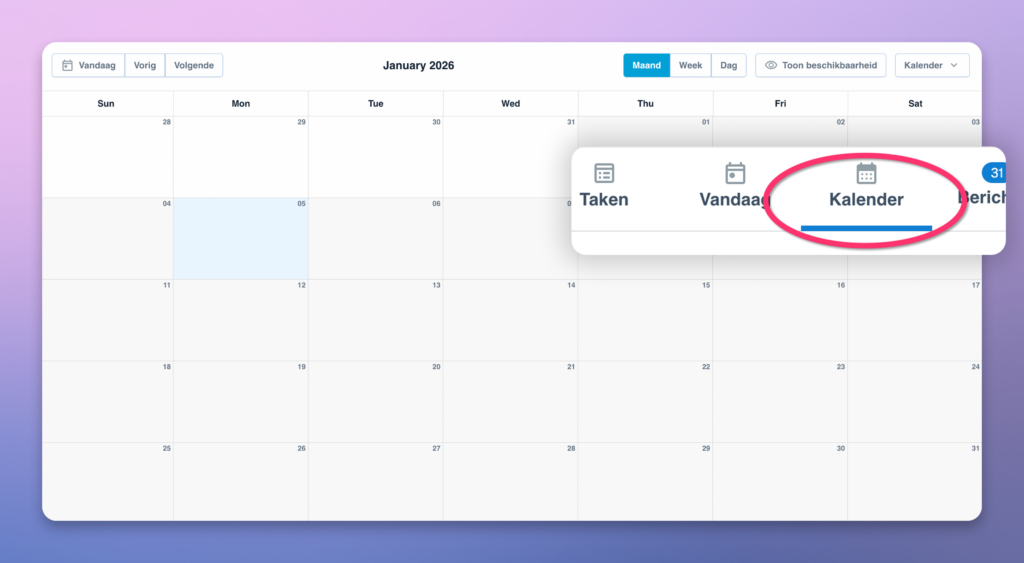
🗓️ New calendar overview for appointments
The appointments tool on Johan.nl now features a beautiful new calendar view. This allows you to see all your appointments at a glance as a professional. This can be displayed per month, per week, or per day. You can select multiple calendars in a single overview!
🥂 Best wishes for 2026
Thank you for your trust in Johan.nl over the past year. We look forward to 2026 and wish everyone a happy and healthy new year. With exciting new developments that we will achieve together!

🆕 Project overview based on latest projects
This small fix simplifies the overview of projects. The project planner is now sorted chronologically by default, with the newest project first (previously, it was sorted by title).

📍Add the appointment to the participant's calendar + location with a single click
A participant receives an appointment confirmation when an appointment is made. The participant can add this appointment in his or her own calendar with one click. It also shows the location. You don't have to set anything up for this, our system automatically adds this to the appointment confirmation emails.

October product update
Now read the October product update that includes the new option for NPS scoring. So from now on you can easily conduct employee satisfaction surveys (MTO) and customer satisfaction surveys (KTO) via Johan's platform.

Product update September
Last month we also made some cool releases and expanded our software with them. Read all about it in our September product update.

Want to get started right away with something new from our product update? Let us know at support@johan.nl and we'll be happy to help.
🆕 New buttons in professional dashboard
You may have already seen them: two new buttons have been added to the home page of the professional dashboard, each with its own function:

- Update tasks - As soon as new information is available, this button appears. It allows you to decide when to refresh the list. This gives more overview and control on the homepage. Automatic refreshing on the homepage caused too high a system load, therefore this solution was deliberately chosen. We are meanwhile working on an even more user-friendly version of this new refresh button.
- Show completed - This button allows you to easily find completed tasks. By default, these are not shown in the overview to keep the dashboard uncluttered.
In particular, please pass this update on to professionals who work with the dashboard.
Do you have questions about using the professional dashboard? Contact us at support@johan.nl.
🥳 New analytics homepage
The homepage of the analytics dashboard has been revamped. By default, the projects are now shown. This gives you a better overview of the different projects. For example, also if you have performed projects over several years.
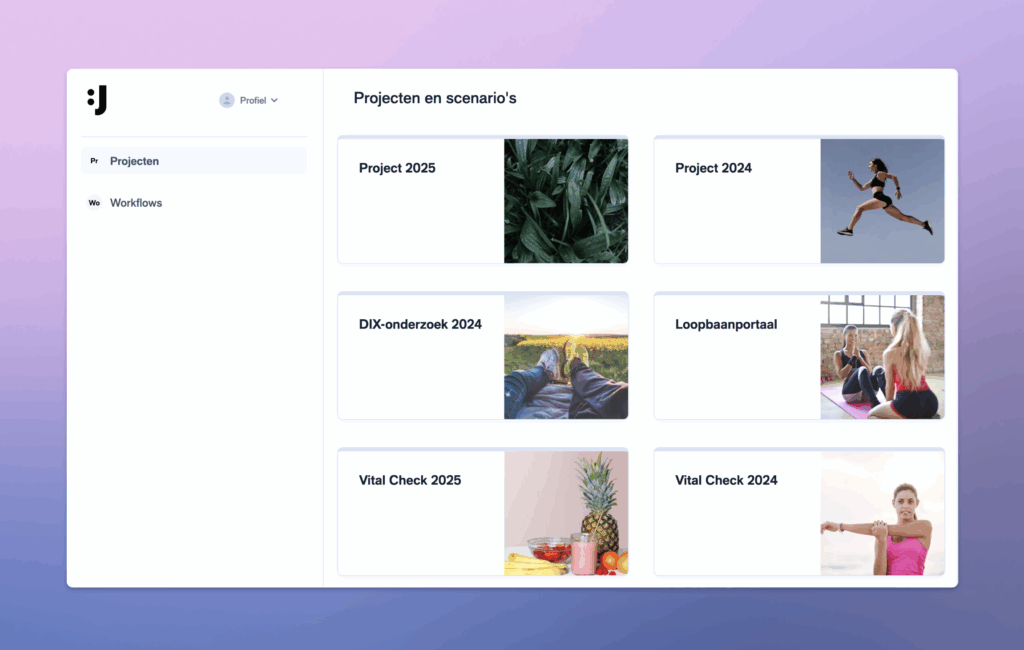
It is still possible to view the old overview of workflows by clicking on "workflows" on the left side.
Have questions about using the updated analytics dashboard homepage? Contact us at support@johan.nl.
Login for professionals and analytics
We notice that we regularly receive inquiries from professionals and analytics users who experience problems logging in. For them, the correct login page is app.johan.nl/login.
If someone does end up on the default login page, they can choose 'Log in with password' at the bottom .

Some professionals or analytics administratorsuse a password in combination with a non-existent e-mail address (for example: first name+hr@bedrijf.com). Since this prevents them from receiving a code, they can only log in with a password. This still remains possible via the "Login with password" option.
Please inform your colleagues to avoid any login problems. All information can be found here.
🌍 Participate quickly without a password
You may have already seen it: our revamped login page at app.johan.nl/start. This makes it possible to participate and log in super fast without the use of a password... 🏎️💨
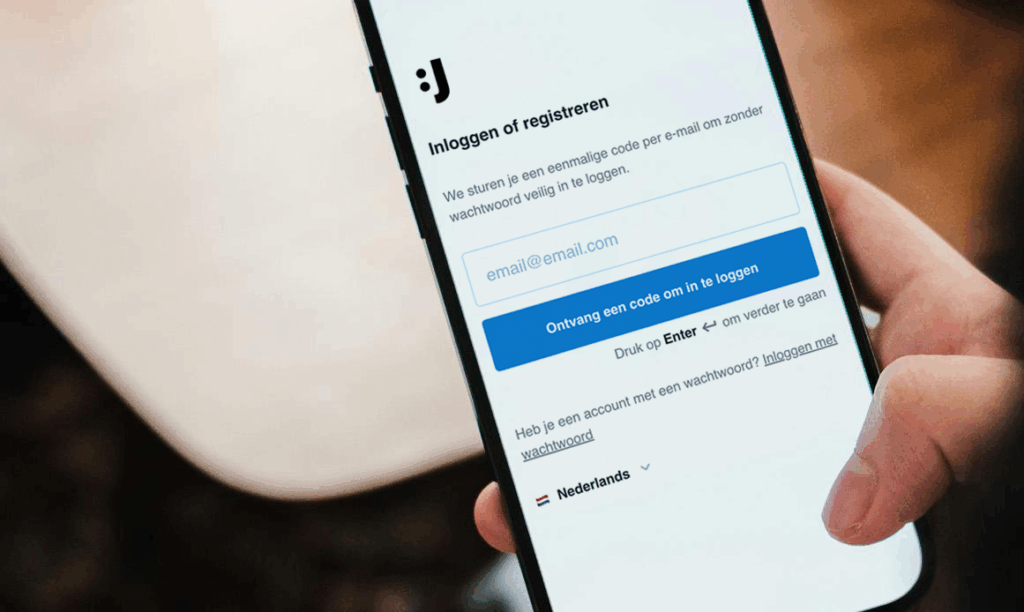
Our goal is to make your program as accessible as possible to participants by minimizing all barriers. While maintaining a super secure account! The new start login page will be fully rolled out soon.
🔒 As a professional / analytics login with a password?
Some professionals or analytics administratorsuse a password in combination with a non-existent e-mail address (for example: first name+hr@bedrijf.com). Since this prevents them from receiving a code, they can only log in with a password. This still remains possible via the "Login with password" option.
Please inform your colleagues to avoid any login problems. All information can be found here.
🌍 Additional languages available
Good news: Johan now speaks even more languages! In addition to Dutch and English, you can now use the platform in Polish, Turkish, German and Arabic. This makes your program accessible to a much wider audience. ✨

New market opportunities for research
With this expansion, it becomes easier to reach target groups that were previously left out of the picture due to language barriers. This makes it possible to carry out programs that were previously not possible and creates space for new markets, such as: labor in seasonal work and (agricultural) production, construction and industry, as well as trade, hospitality and healthcare.
Important to know: the systems are fully translated, for questionnaires you can add the translations yourself. Read more about setting up translations here.
Also receive our Product Updates?
Do you want to stay informed about all our updates? Click here to subscribe to the Johan.nl Product Update and receive monthly updates in your mailbox.
⚡ Setting smart conditions - now even easier!
Good news: setting rules (conditions) in Johan has become a lot clearer! The function has remained the same, but the new interface makes setting faster, smarter and a lot more user-friendly.

Everything is now neatly grouped, you need to click less and you can see at a glance exactly what you are setting. This not only makes your projects personal and flexible, but also keeps them organized. Read all about it here.
🔢 Enter numbers smarter on mobile devices
Entering numbers on mobile devices is now much easier! In fields where only numbers may be entered, the numeric keypad opens automatically. That means no more unnecessary keyboard changes and faster result entry - ideal for professionals who often have to enter multiple values in succession, such as in health checks. Efficient and less prone to errors! 🚀

🗓️ Easily create time slots in our appointment tool
With the new appointment tool it is possible to make calendar appointments part of your program. Participants can schedule their own appointments at preset time slots or you can do that for them. That works super handy! With the new update it is now even easier to set up time slots. You simply type in a time and the next time slot is automatically recognized! Read more about time slots here.

🎨 Whitelabel & branding (+ send mails from own domain)
It is possible to show your program in your own style - with your own logo, colors, subdomain. No visible Johan branding, but a recognizable and professional image for your customers and participants. It is also possible to have email sent through your own domain for even more recognition for your participants. Safe and secure!
Want to know more about this? Check out our info page.
